- 2020-07-07
- 2020-07-27
- 2020-07-29
- 2020-08-03
- 2020-08-07
- 2020-09-09
- 2020-10-15
- 2020-11-30
- 2020-12-02
- 2021-04-21
- 2021-05-14
- 2021-07-07 - New notification - Daily exportation summary
- 2021-07-29
- 2021-08-13
- 2021-09-24
- 2021-09-30 Enforcing the HTTPS protocol and high security cipher suites
- 2021-12-08 - New authentication process and multi-factor authentication
- 2022-03-02
- 2022-03-08
- 2022-04-22
- 2022-05-04
- 2022-05-31 - New licence model for library offers
- 2023-08-04
- 2023-11-13
- Service for obtaining the sales points for a publication
- Unable to access the digital warehouse
- Why can't I see all options?
- What to do if you enter the wrong ISBN?
- How do I contact the support team?
- Is it possible to extract the back cover of my PDF file?
- Do I need a different ISBN for each of my formats?
- What can I do if my publications do not appear in the catalogue of some online bookstores?
- 2020-07-07
- 2020-07-27
- 2020-07-29
- 2020-08-03
- 2020-08-07
- 2020-09-09
- 2020-10-15
- 2020-11-30
- 2020-12-02
- 2021-04-21
- 2021-05-14
- 2021-07-07 - New notification - Daily exportation summary
- 2021-07-29
- 2021-08-13
- 2021-09-24
- 2021-09-30 Enforcing the HTTPS protocol and high security cipher suites
- 2021-12-08 - New authentication process and multi-factor authentication
- 2022-03-02
- 2022-03-08
- 2022-04-22
- 2022-05-04
- 2022-05-31 - New licence model for library offers
- 2023-08-04
- 2023-11-13
- Service for obtaining the sales points for a publication
- Unable to access the digital warehouse
- Why can't I see all options?
- What to do if you enter the wrong ISBN?
- How do I contact the support team?
- Is it possible to extract the back cover of my PDF file?
- Do I need a different ISBN for each of my formats?
- What can I do if my publications do not appear in the catalogue of some online bookstores?
- 2020-07-07
- 2020-07-27
- 2020-07-29
- 2020-08-03
- 2020-08-07
- 2020-09-09
- 2020-10-15
- 2020-11-30
- 2020-12-02
- 2021-04-21
- 2021-05-14
- 2021-07-07 - New notification - Daily exportation summary
- 2021-07-29
- 2021-08-13
- 2021-09-24
- 2021-09-30 Enforcing the HTTPS protocol and high security cipher suites
- 2021-12-08 - New authentication process and multi-factor authentication
- 2022-03-02
- 2022-03-08
- 2022-04-22
- 2022-05-04
- 2022-05-31 - New licence model for library offers
- 2023-08-04
- 2023-11-13
- Service for obtaining the sales points for a publication
- Unable to access the digital warehouse
- Why can't I see all options?
- What to do if you enter the wrong ISBN?
- How do I contact the support team?
- Is it possible to extract the back cover of my PDF file?
- Do I need a different ISBN for each of my formats?
- What can I do if my publications do not appear in the catalogue of some online bookstores?
Adding and editing an audio table of contents
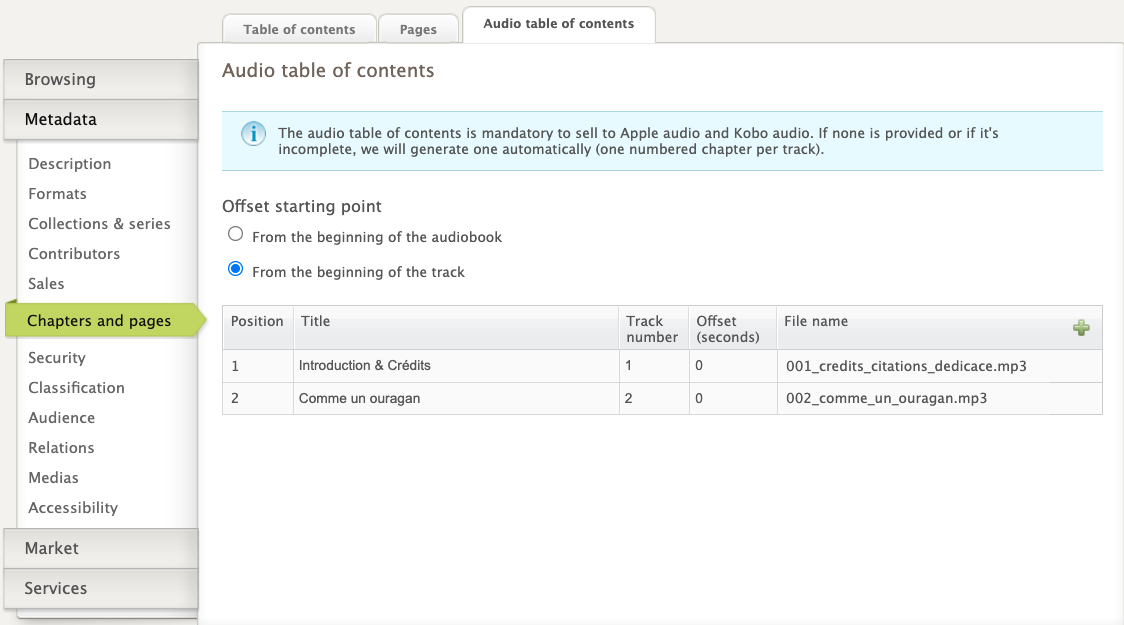
To document the table of contents of your audio publication:
Go to the Chapters and Pages tab > Audio Table of Contents
Click on the " + "button
Enter the title of each section or chapter, and the corresponding track number
Also enter the chapter's timestamp, i.e. the location on the track, in seconds, at which the chapter begins

In the case where each track contains a complete chapter, the timestamp is always 0. However, if a track contains two chapters, and the second chapter starts at the 120th second, the timestamp for that chapter will be 120.
You don't have to enter the file name of each track; just click on the validation icon and the platform will automatically retrieve it, according to the track number

It is therefore crucial to respect the naming convention for audio tracks. If your tracks are mislabeled, the platform may assign them to the wrong chapters.
Note
If you do not provide a table of contents, the platform will automatically create one based on the tracks added for the format and their numerical order.